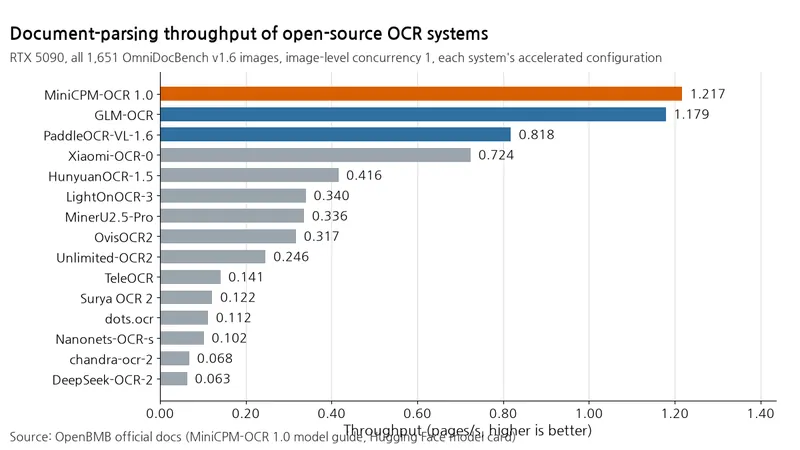
The MiniCPM-OCR 1.0 SDK reads text, tables, and formulas from PDFs and images and converts them to Markdown. To reduce bulk document processing time, consider both the tool and how many images it processes at once. In OpenBMB's official comparison, raising concurrency on the same model yielded a larger gain than its throughput lead over the top competing system.
Measurement method
The comparison used one NVIDIA GeForce RTX 5090 and all 1,651 images in OmniDocBench v1.6. Each system used its official SDK's default settings with acceleration enabled and image-level concurrency set to 1. Recognition of regions within a page runs in parallel, so tasks within a page overlap even at concurrency 1. The metric is pages processed per second.
Table: MiniCPM-OCR 1.0 throughput by image-level concurrency
Conditions: NVIDIA GeForce RTX 5090, all 1,651 images in OmniDocBench v1.6
Unit: pages/s
| Image-level concurrency | Throughput |
|---|---|
| 1 | 1.217 |
| 2 | 1.613 |
| 4 | 1.888 |
| 6 | 2.031 |
| 8 | 2.133 |
Results
Table: Document parsing throughput comparison of open-source OCR systems
Conditions: NVIDIA GeForce RTX 5090, all 1,651 images in OmniDocBench v1.6, image-level concurrency 1, acceleration enabled for each system, measured by OpenBMB
Unit: pages/s; the source does not specify units for P95 or P99
| System | Pages/s ↑ | P95 processing time ↓ | P99 processing time ↓ |
|---|---|---|---|
| MiniCPM-OCR 1.0 | 1.217 | 2.1 | 3.8 |
| GLM-OCR | 1.179 | 2.0 | 4.7 |
| PaddleOCR-VL-1.6 | 0.818 | 2.8 | 6.0 |
| MinerU2.5-Pro | 0.336 | 10.0 | 15.4 |
P95 and P99 are the 95th and 99th percentiles of per-sample processing time. In OpenBMB's table, the top two systems have similar throughput, but MiniCPM-OCR 1.0 has lower P99 latency at 3.8 versus GLM-OCR's 4.7. Its throughput is about 1.49x that of PaddleOCR-VL-1.6 and about 3.62x that of MinerU2.5-Pro. The table retains only representative competitors. See the official source for all 15 systems.
In this test, raising concurrency further increases the same system's throughput. At image-level concurrency 8, it reaches 2.133 pages/s, or 1.75x the throughput at concurrency 1. However, doubling concurrency from 4 to 8 raises throughput only about 13%, from 1.888 to 2.133 pages/s. Throughput does not grow proportionally with concurrency, so check incremental gains as you raise the setting.
Input compression and acceleration design
MiniCPM-OCR 1.0 is a 1.3B-parameter OCR-specific model based on MiniCPM-V 4.6, combining a SigLIP vision encoder with a Qwen3.5 language model.
It uses up to 9 image crops as input and compresses visual tokens by 4x. OpenBMB says it compresses tokens early inside the vision encoder to reduce computation in subsequent encoding layers.
Image preprocessing uses LLaVA-UHD v4 to slice high-resolution images into 448×448 patches alongside a low-resolution overview. It also applies automatic Upright for orientation correction and adaptive Upsize to raise resolution. The official design overview explains these mechanisms. However, it provides no isolated measurements of how much each component contributes to throughput differences from competing systems.
DSpark handles acceleration. A small draft model proposes tokens, and the main model verifies them in a batch. OpenBMB reports that enabling DSpark improves end-to-end processing efficiency by 55% over disabling it.
The draft model card lists a BF16 draft head with 296,837,889 parameters. Its 5 draft layers propose 15 tokens per pass.
The reproduction guide requires changing only DSpark on/off for the comparison. Main model weights, dataset, hardware, and SDK settings must remain identical. Commands and logs for that comparison have not yet been added.
Selection criteria
For a single-server workload, image-level concurrency 8 delivered the highest throughput in this test. Check available memory and backend capacity, then consider raising concurrency gradually. For backend selection, official MiniCPM-OCR deployment examples enable DSpark by default for vLLM, SGLang, llama.cpp, and Ollama; FlagOS does not support DSpark. The vLLM-based DSpark deployment example caps per-instance concurrency with --max-num-seqs 32. Pair the draft head and main checkpoint from the same release. For quality, official scores are 93.68 on Real5-OmniDocBench, 96.51 on OmniDocBench v1.6, 82.7 on olmOCR-Bench, and 54.7 on OCRBench v2. The scoring guide describes how these are calculated. Real5 equally averages composite scores for five capture conditions, including scans and warped pages. OmniDocBench v1.6 combines text, formula, and table accuracy across entire pages. olmOCR-Bench averages category-level pass rates for rule checks such as text presence, reading order, and table relationships. OCRBench v2 aggregates metrics for Chinese and English tasks. The Wild-OmniDocBench score of 92.39 is measured after SDK rotation correction, and each benchmark retains its original scale. Actual throughput varies with page content, backend, concurrency, and hardware. The SDK release notes state that the SDK first appeared on PyPI on October 28, 2026. The quick-start configuration uses 32 concurrent recognition requests.
After installing the SDK and starting the recognition service, run the official conversion example from the repository root. It converts a PDF to Markdown.
source .minicpm-ocr/bin/activate
minicpmvocr parse \
  --device cuda:0 \
  --server-url http://127.0.0.1:18499 \
  --model minicpm-ocr \
  --input doc.pdf \
  --output doc.md
In this table, the throughput gap over the top competing system is small, while raising the same model's concurrency from 1 to 8 yields a larger 1.75x gain.