TensorRT 11.1 added the Global Performance Tuner, an automatic tuner that explores how engines, the executables that perform inference, are built. NVIDIA says that enabling accuracy validation with reference outputs and thresholds restricts ranking to candidates that pass. It says this approach can automate inference optimization previously adjusted for each model and GPU. TensorRT 11.1 was released on June 24, 2026; as of October 2026, the latest release is 11.4.
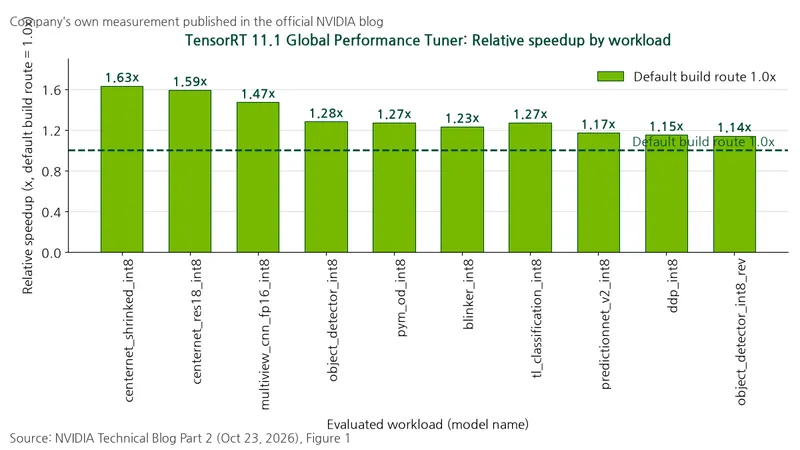
According to NVIDIA’s official blog published on October 23, 2026, relative performance across 10 workloads, or sets of computing tasks, ranged from 1.14 to 1.63 times the default build route.
Measurement method
Target: TensorRT 11.1 Global Performance Tuner, trtexec --tuneBuildRoutes tuning loop. Baseline: the default build route with all knobs, or compiler setting switches, at their defaults, normalized to 1.0x. Values are scaled against this baseline. Candidate selection: discard routes that crash and, when accuracy validation is enabled, those that fail validation, then select the fastest engine among the remaining candidates. Data source: NVIDIA’s official blog, Part 2, Figure 1, October 23, 2026.
Results
Table: Tuned performance relative to the default route by workload
Conditions: TensorRT 11.1 tuner; 10 workloads from Figure 1 in NVIDIA’s official blog; GPU, batch size, and number of searched routes not disclosed in the source
Unit: Relative performance multiplier (x)
| Workload model | Default build route | Relative performance after tuning |
|---|---|---|
| centernet_shrinked_int8 | 1.0 | 1.63 |
| centernet_res18_int8 | 1.0 | 1.59 |
| multiview_cnn_fp16_int8 | 1.0 | 1.47 |
| object_detector_int8 | 1.0 | 1.28 |
| pym_od_int8 | 1.0 | 1.27* |
| blinker_int8 | 1.0 | 1.23 |
| tl_classification_int8 | 1.0 | 1.27* |
| predictionnet_v2_int8 | 1.0 | 1.17* |
| ddp_int8 | 1.0 | 1.15 |
| object_detector_int8_rev | 1.0 | 1.14 |
Note: * appears in the original figure, with no explanation of its meaning.
Gains are uneven. The top three workloads improved by 47–63% over baseline, while the bottom three improved by 14–17%, so gains must be measured separately for each model. These are NVIDIA’s own published measurements.
Why results differ
First, the default build route is one optimization approach with fixed internal heuristics, or judgments encoded as rules by engineers. NVIDIA says no single approach is best for every model.
Second, the sum of separately measured kernel times, for units of computation running on the GPU, is not the same as total engine execution time. The Global Performance Tuner loop measures and optimizes end-to-end performance, from input to output, rather than layer-level benchmarks.
Third, adding accuracy requirements reduces the candidate pool. NVIDIA presents a thought experiment in which toggling four settings produces 16 candidates, with stricter accuracy criteria leaving fewer that pass. This is a conceptual example explaining accuracy constraints, not actual settings in a specific TensorRT release.
Limitations
The official blog did not disclose the GPU model, batch size, or number of routes searched for Figure 1. The official documentation notes that the default build route may already be optimal and that gains vary by model, hardware, and version. It also states that non-default routes have no performance guarantees across major TensorRT releases.
Selection criteria
Measure the default route first. Choose a search strategy to fit the search space. fast changes one knob at a time, so it scales linearly with the number of knobs. mixed follows fast with an exhaustive search of combinations of knobs that improved performance. full generates all combinations, growing exponentially. The official repository implementation (trtexec sampleTuning.h) caps the improved knobs passed to mixed stage 2 at 10 (kMixedSearchMaxPositiveKnobs). Set accuracy criteria first. Validation requires both reference outputs and a threshold. The loss metric, which quantifies output differences, defaults to l0; choices include l1, l2, lInf, and cos. Overly strict criteria may eliminate every faster route. Set tolerances to match the deployed application’s actual quality needs, using reference outputs covering representative inputs and important edge cases. The official documentation provides this command example:
  trtexec --onnx=model.onnx \
  --tuneBuildRoutes="-match_ragged_mha=[on|off]" \
  --loadInputs=input:input.bin \
  --loadRefOutputs=output:ref_output.bin \
  --accuracyThreshold=0.5 \
  --saveEngine=best.plan
Control costs with flags. --dryRun lists candidate routes without building them, so run it before the actual search to gauge its size. The official documentation says it works with any search mode, but the official blog says it cannot be used with mixed. Following the blog, preview only with fast or full. --tuningCacheFile logs each iteration’s route, GPU time, and accuracy as one JSON line; use --continue to resume. --tuningTimeOut sets the total time budget. --saveAllEngines retains every engine and uses substantial disk space, so it is mainly for debugging. Match versions when moving to deployment. Knobs and defaults vary with the tuner version, so use the same TensorRT and tuner versions for search and deployment. Retune if the model, shape, input data size or structure, GPU, or CUDA changes.
With accuracy validation enabled, accuracy criteria determine candidate eligibility, and end-to-end performance determines the winner among those that pass.