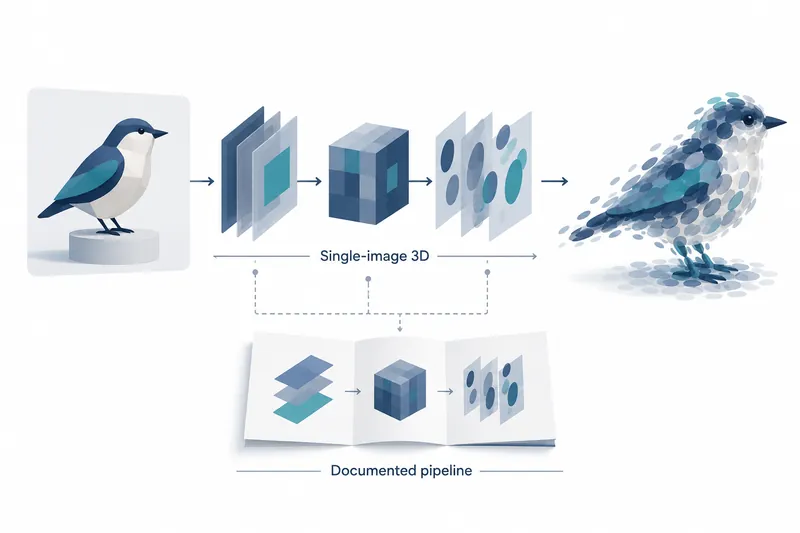
Speridlabs released Idol's weights and inference code to create a viewable 3D object from one photo. Developers and designers can remove backgrounds, generate 3D objects, and save standard files for existing viewers.
1. From a single image to a 3D asset
Idol takes rendered images, generated images, and real photos to produce 3D Gaussian splats, a point-cloud representation that includes unseen sides. It uses 32,768 to 1,048,576 small Gaussian elements, with 262,144 by default.
The output uses the standard 3DGS .ply format. Command-line runs also save the preprocessed image used by the model and the input's estimated camera direction and position for inspection and further processing.
The weights and repository use the Apache-2.0 license.
2. A multistage pipeline from input preparation to generation
BiRefNet removes the background during preprocessing. The pipeline adjusts the padding around the object according to the input mode. Photo mode leaves more padding than synthetic image mode.
DINOv3 and FLUX.2 VAE act as encoders that turn the input image into guidance for generation.
DiT, a transformer that reduces noise using image information, then handles generation. It uses 50 Euler steps by default. The decoder converts the generated model output into a 3D Gaussian representation.
3. Run in Python after obtaining encoder access
The repository requires Python 3.10 or later, PyTorch 2.5 or later, and an NVIDIA GPU with CUDA support.
DINOv3 and FLUX.2 VAE are gated models, so users must accept each model's terms on Hugging Face and log in.
On the first run, about 3 GB of Idol weights and both image encoders are automatically downloaded to the cache.
The original Python pipeline example is shown below.
from idol import IdolPipeline

pipeline = IdolPipeline.from_pretrained("speridlabs/idol")
output = pipeline("photo.jpg", mode="real", seed=42, num_gaussians=1_048_576)
output.gaussian.save_ply("photo.ply")
output.preprocessed_image.save("photo_input.png")
4. GPU-dependent times under the same generation settings
The repository says Idol builds on TripoSplat, an existing single-image 3D model. In the company benchmark, one H100 ran 50 steps with 262,144 Gaussians. Idol took 6.8 seconds per request versus TripoSplat's 9.9 seconds, about 31% less. Idol also scored better on average metrics for the input view and seven novel views. Its mean novel-view DINOv2 score was 0.781 versus TripoSplat's 0.743 on this higher-is-better metric.
The GPU times below come from the company's report: 50 steps and 262,144 Gaussians from one image. All GPUs used the same code and settings, with medians across 8 images.
Table: Idol generation times by GPU
Conditions: 50 steps, 262,144 Gaussians from 1 image, identical code and settings, median across 8 images per GPU, one GPU per device
Units: memory (GB), request time (seconds)
| GPU | Memory | Request time |
|---|---|---|
| B300 | 269 | 3.4 |
| B200 | 179 | 3.6 |
| H200 | 140 | 6.6 |
| H100 | 80 | 6.7 |
| RTX 5090 | 32 | 14.1 |
| A100 | 80 | 16.3 |
| L40S | 45 | 16.6 |
| RTX 4090 | 24 | 19.1 |
| RTX 3080 | 10 | 46.2 |
| L4 | 22 | 54.6 |
It also runs on consumer GPUs such as the RTX 4090 in the table, allowing developers to design workflows around their hardware's processing times.
The model card, which lists model details and usage terms, also cites company figures of 7.2 GB memory usage and runs under 2 seconds. However, it does not specify the GPU or settings used for that speed.
5. Less photography, but storage and generation steps need tuning
Single-image input and standard file output reduce the need to photograph multiple angles or convert formats. However, increasing the Gaussian count also increases storage needs.
The company's project page lists file sizes of 0.4 MB for 32,768 Gaussians, 3.2 MB for 262,144, and 12.2 MB for 1,048,576.
The repository says fewer generation steps improve speed but reduce detail. When tuning speed, it is worth deciding how much detail is needed alongside the processing time.
Idol's key contribution is combining preprocessing, 3D generation, and standard file output from one image into a single workflow, reducing the steps needed to start creating 3D assets.