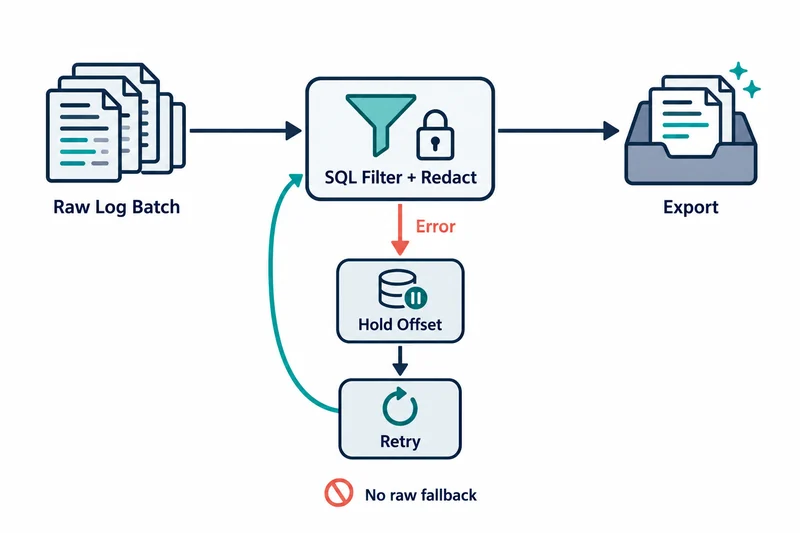
Cloudflare published a technical post on October 12 explaining how Logpush Transformers work. Logpush exports Cloudflare logs to SIEMs, analytics platforms and object storage.
Transformers had already become generally available (GA) during Birthday Week. The October 12 post is a technical explanation of an existing feature, not a new launch.
For teams choosing where to filter logs or remove sensitive data, the key point is that a transform failure does not turn into a transform bypass.
A single SQL query attached to an NDJSON job
A Transformer applies one SQL query to records before Logpush delivers a batch. WHERE selects the records to keep, and the SELECT output becomes the delivered record.
The target must be an NDJSON output job using the same dataset. If the FROM table name differs from the job’s dataset, attachment fails.
It is a bounded record transform, not a general SQL data warehouse. Joins, subqueries, aggregation, window functions and ORDER BY are not supported.
Transforms executed inside the Logpush delivery process
According to the post, transforms run inside the Logpush delivery service with Apache DataFusion, a Rust query engine, without a separate remote call. An early prototype invoked Workers, but that put a network call into the delivery path, so this design was chosen.
If a transform cannot execute, the job’s delivery offset does not advance and the untransformed batch is not sent. Cloudflare describes this as a fail-closed design.
Logpush progressively delays retries and reports errors on the job. Jobs that stay in a failing state for an extended period are disabled automatically.
Caveats: retries are not a retention promise
The documentation states that if failures continue, records in the affected batches are eventually dropped and cannot be recovered. Holding the offset and retrying does not guarantee unlimited retention or eventual delivery.
The last error appears in the job’s last_error field. Common causes listed are output exceeding the size limit and internal Cloudflare errors.
The trade-off is clear. Keeping untransformed logs from leaving can break the stream needed for an incident investigation.
Conditions for moving from filters to a Transformer
A Logpush job can have either filters or a Transformer, not both. In the dashboard, Transformer Studio converts the existing filter to an equivalent SQL predicate, which must be copied into WHERE to keep the filtering behavior.
The API does not perform this conversion. After converting the filter to a SQL predicate in WHERE yourself, the same job update request clears filter and sets transformer_id.
{
	"filter": "",
	"transformer_id": 42
}
Setting transformer_id without clearing filter makes the API return 400. Attaching new SQL without carrying over the existing selection rules changes which events leave.
Preview runs against one canned sample record per dataset. A successful preview is not evidence that every production case was exercised.
Output conditions before SQL syntax
Adoption fits better when it starts from the desired output conditions rather than the shortest query. First decide which fields may leave, which to keep for investigation and which records to exclude on purpose.
Test with representative records that include missing values or unusual content, then check the actual delivered result. Removing or renaming one obvious identifier does not mean sensitive data in the remaining fields is gone.
This part is a policy and data review that a SQL syntax check does not finish.
Monitoring transform success and record arrival separately
Monitoring has to answer separately whether transforms succeed and whether the expected records arrive.
A drop in volume may be the filtering effect, an overly broad exclusion or a stalled job. Keeping the approved query and expected output examples lets changes be judged against the same baseline.
Raw-log fallback is not a recovery plan. A failed transform is something to diagnose and fix.
Fail-closed behavior has value only alongside delivery monitoring and a plan for missing data, and it replaces neither.