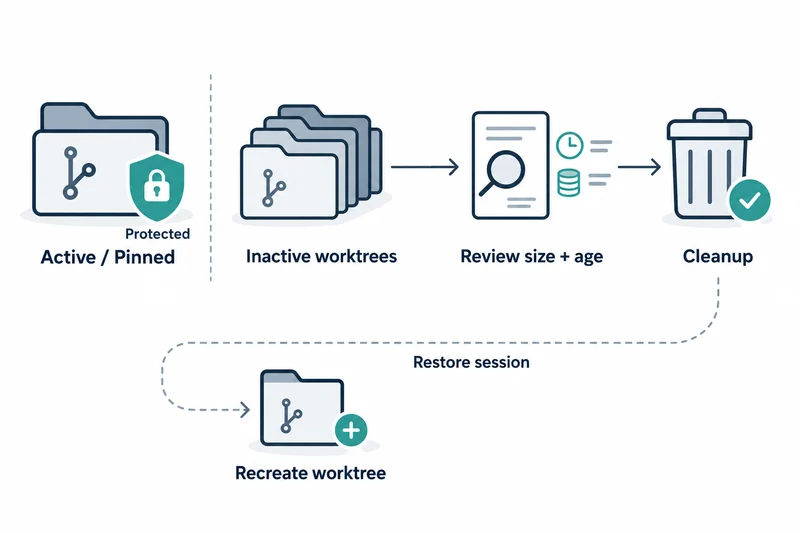
VS Code 1.141 was released on October 7. The Chat: Open Worktree Cleanup command shows how much disk space inactive agent session worktrees use and lets you remove the ones no longer needed.
The view filters sessions by how long they have been inactive and shows each worktree's size so you can pick what to clean up. The same view configures automatic cleanup for sessions with merged pull requests and whether cleanup is suggested when session storage grows large.
When chat.agentSessions.sessionStorageCleanupSuggestion.enabled is on, the Agents window notifies you once enough inactive worktrees accumulate or they use enough disk space.
What cleanup and restore actually do
Cleanup marks the selected sessions as done and deletes their worktrees. Restoring a session later recreates its worktree, and active, running, needs-input and pinned sessions are protected from cleanup.
According to the Git documentation, one repository can have multiple working trees, and those created with git worktree add are called linked worktrees. git worktree remove deletes only clean worktrees with no untracked files or modifications; otherwise --force is needed.
git worktree prune is a separate command that cleans up stale administrative files. This background explains how deleting checkouts frees space, but it does not show the internal implementation of VS Code's cleanup command.
The difference between recreating and recovering
The release notes say the worktree is recreated. No sentence says that files or notes left uncommitted at deletion time come back.
A merged pull request is only evidence of the submitted change, and a local checkout can still hold work not in the PR, such as notes or generated inputs.
What age and size tell you
Old, large worktrees stand out, but size alone says nothing about the value of what remains. An old session may be abandoned work or an investigation paused while waiting for an answer.
So on a first cleanup it is safer to look at the remaining changes in the selected checkout alongside the size shown in the view.
When automatic cleanup fits
If a team habitually keeps needed changes and investigation notes outside the temporary checkout before merging, automatic cleanup of merged-PR sessions removes only disposable state. This is a suggestion about working practice, not behavior VS Code guarantees.
Pinning a session that should stay open protects it from cleanup, but pinning does not replace a proper storage location for important work.
Caveats: what this article did not verify
This article did not delete or restore worktrees or measure disk usage. Whether uncommitted state is restored remains unverified.
The lower-risk order is to clean up finished sessions by hand first, check the space freed and whether kept work can be resumed, and only then enable automatic cleanup.
VS Code 1.141's worktree cleanup marks sessions done, deletes checkouts and recreates only the worktree on restore, so uncommitted local work has to be saved elsewhere before cleanup.