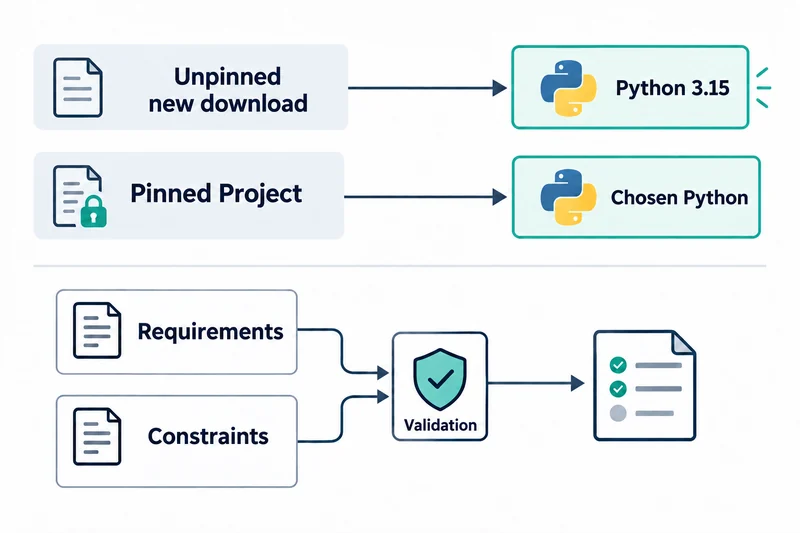
uv 0.13.0 was released on October 9 UTC, October 10 in Korea. The default stable Python downloaded when no version is requested or pinned changed from 3.14 to 3.15.
Compatible Python installations that are already present are still used. For example, uv venv can keep using an installed Python 3.14.
If no suitable interpreter is installed and automatic downloads are enabled, commands such as uv venv and uvx python can now download Python 3.15. The release notes say this can be avoided by requesting 3.14 explicitly, as in uv venv --python 3.14, or by recording the version for a project with uv python pin 3.14.
Python version requests and automatic downloads
According to uv's Python versions documentation, the --python option requests a needed version, and uv python pin creates a .python-version file in the current directory. uv looks for this file in the working directory and its parents and uses it as the default version request.
Automatic downloads can be disabled with the python-downloads setting, or by passing the --no-python-downloads flag to any uv command.
Pinning the uv executable's version and pinning the Python version are separate decisions. The tool version determines which selection behavior applies, and the Python request determines which interpreter a job uses.
Stricter constraints file handling
Previously, --require-hashes in constraints files included with -c from a requirements file was ignored. Now uv honors the directive and requires hashes for every requirement in the installation, so an install that used to succeed can fail if an entry lacks a hash.
There is no opt-out while the directive is present. Either add the missing hashes, or remove the directive from the included constraints file if hash checking was not intended.
Editable (-e) requirements in included constraints files are also rejected with an error instead of being silently ignored, matching pip's behavior. Such entries move to a requirements file passed with -r or are passed directly with --editable.
Interpreter differences that surface in new CI
A development machine can succeed by reusing an installed 3.14, while a clean CI environment can download 3.15. Even with the same uv version, results can diverge depending on which Python is installed.
Recording the interpreter version actually selected in test logs makes the difference between the two environments easy to compare.
What a new failure points to
A hash error may not be a resolver regression but the first enforcement of an integrity policy that used to be ignored. The place to look is not only the top-level requirements file but every file linked through -c.
When moving editable entries, constraints and install requests play different roles, so what actually gets installed can change after the move.
Caveats: when the two changes land at once
If interpreter selection and constraints handling change in the same upgrade, a failure has two possible causes, and even a success can hide an environment difference. This article did not run uv installs, environment creation or dependency resolution itself.
The October 10 issue follows the Korean date, while the release source is dated October 9.
uv 0.13.0 moves unpinned Python downloads to 3.15 and enforces hash and editable rules in included constraints files, so upgrade failures are easiest to diagnose with interpreter selection and constraints checked apart.