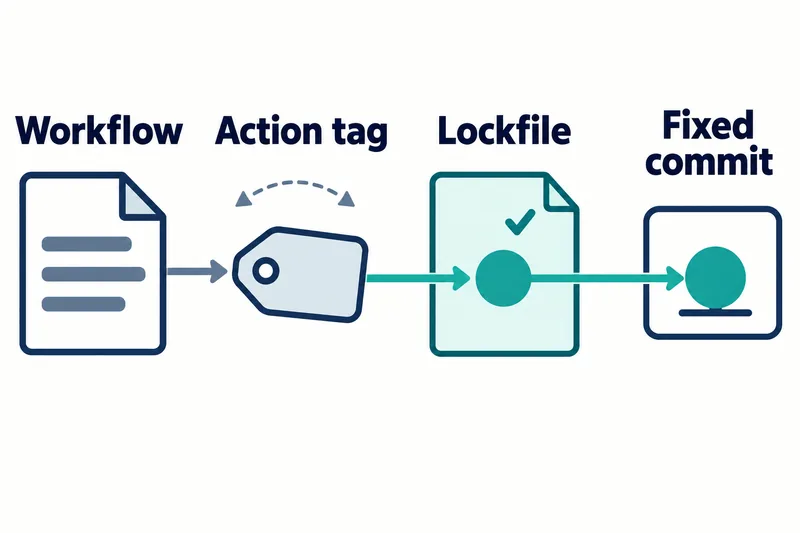
On October 14, 2026, GitHub announced lockfiles to pin the versions of external code used in GitHub Actions build and test automation. Developers can keep readable version names in workflow files without letting later changes to those names change the code that runs.
The feature is in public preview and may change. It is enabled for selected workflows—the procedures that define automated jobs—and does not apply automatically to existing workflows.
Different code behind the same tag
An action is a component that performs a specific task within a workflow. Using an action from another repository makes its code a workflow dependency. Without locking, a tag or branch selects whatever code that name points to at execution time.
A tag is a name that can move like a bookmark, while a commit identifies the state of code at a particular point. A branch also points to different commits as development progresses. Even if a tag in a workflow file stays unchanged, its provider can move it, changing the commit selected on the next run.
Workflows could already pin execution by specifying a full commit identifier directly in the workflow file. The new feature offers an alternative: keep the readable version name and record the commit to execute in a separate lockfile.
Readable names, recorded execution commits
According to GitHub’s documentation, a lockfile records both the reference name, such as a tag or branch, and the selected commit. A workflow with locking enabled runs that recorded commit even if the reference later points to different code.
Suppose a tag initially points to commit A, and the lockfile records that commit. If the provider later moves the same tag to commit B, the locked workflow still runs the original commit. This is a hypothetical example of the mechanism, not a result from an execution test.
Lock entries also include numeric identifiers for the owner and repository. At runtime, GitHub Actions checks these to verify that the repository supplying the code is the same one recorded when locking. It checks repository identity as well as code version.
Locking covers both directly called actions and the dependencies those actions use. Because it records components beneath the actions listed directly in the workflow file, the review scope extends beyond the visible list of calls.
GitHub says repositories that adopt lockfiles no longer need to put full commit identifiers directly in workflow files. Pinning is not removed; its location moves from the workflow file to the lockfile.
Repository boundaries and limits on safety and reproducibility
A reusable workflow is a set of procedures that another workflow can call. If it lives in another repository, its internal dependencies are managed by the lockfile in the repository where it is defined. The caller’s lockfile does not lock the other repository’s internals, so that repository also needs to adopt locking.
A locked commit must exist on a branch in its source repository. Recording a commit in a lockfile does not mean any commit can continue to run regardless of where it exists.
GitHub explicitly states that locking does not assess whether a dependency is safe. Pinning code does not replace a separate review for malicious behavior or vulnerabilities. This article explains the announcement and documentation; it presents no independent execution tests or measurements of security improvements.
The reproducibility benefit described in the documentation also needs to be understood within the scope of dependency commit selection. Selecting the same commit fixes one build ingredient, not the entire result. There is no basis for interpreting the feature as also making execution environments, downloaded packages, or external services identical.
Available plans and adoption changes
The announcement lists availability for Enterprise Cloud, Enterprise Cloud with data residency—the choice of where data is stored—Team, and Free plans.
Teams can enable locking for workflows individually or in bulk. Selecting workflows defines the scope; generating lock entries for each action dependency records that scope. The extension generates the lockfile and workflow changes. The team checks that every action dependency in the selected workflows has an entry, then reviews and commits both changes together.
The file to check is .github/workflows/actions.lock. It is generated and maintained with the gh actions-lock extension for GitHub CLI. The documentation advises against editing it by hand. In each entry, ref is a reference name such as a tag or branch, and commit is the commit. The owner_id and repo_id fields are numeric identifiers for the owner and repository, respectively. The full commit identifier discussed earlier is the SHA.
Review covers changes to recorded commits, not just tag names. If a lock entry changes from A to B while retaining the same tag, the code selected for execution changes. The key check is whether the selected workflows match the generated dependency entries, rather than treating file generation alone as completed adoption.
The feature is worth considering for teams that want both readable tags and pinned execution. Adoption involves choosing workflows and assigning responsibility for reviewing lock changes. If those workflows call reusable workflows in other repositories, responsibility for maintaining those repositories also needs to be clear.
The key change is not removing tags, but moving the choice of which commit runs into a record that the team reviews and maintains.